
The latest source code of next generation pcmanfm, aka pcmanfm2, in git repo already supports desktop management. The new desktop manager looks better than the old one in pcmanfm 0.5.
Let’s see the screenshot:
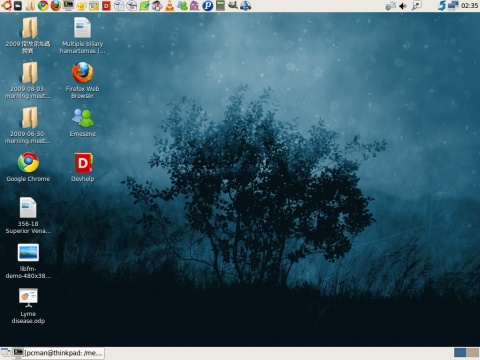
After compiling the latest source code, run the desktop manager with:
pcmanfm2 –desktop
Then you’ll see the desktop. Change the wallpaper from the popup menu or invoke the desktop configuration with:
pcmanfm2 –desktop-pref
Known Issues:
-
RTL is not yet handled, but it will be fixed in final release.
-
Icons are not yet movable, but it will be supported in next major release
-
Trash can is not yet shown on the desktop
-
Tools drawing on the root window might not work correctly since our desktop window covers the root window. However, using a window covering the whole screen space to implement desktop management feature is suggested in freedesktop.org specs, and this is what Gnome and XFCE did, too. So, it’s not a bug.
Please test the latest pcmanfm and libfm in our git repo. The first public tarball release is coming soon!
4 responses to “Desktop support of PCManFM is working now!”
lubuntu:
I’m posting this from a lubuntu-lucid-alpha 2.iso its the fastest booting live-session I’ve seen!
http://people.ubuntu.com/~gilir/lubuntu-lucid-alpha2.iso
Desktop:
I noticed that there was no option for controlling the desktop in that release with pcmanfm2, but now I read you just made it work! Great news!
Keep up the good work, it will be the fastest ubuntu version for old hardware. Xubuntu is a joke compared to this. If they replace/add Firefox with midori webbrowser it will be a fedora spinoff killer!
unfortunately the command not works: git clone git://pcmanfm.git.sourceforge.net/gitroot/pcmanfm/libfm
regards
[…] Visto en: LXDE Blog […]
Sorry, I can now download the source from git repository. It was my own network problem.
Regards